
Stop chasing contractors for paperwork
Set what each site requires. Our contractor compliance management software lets contractors upload their documents and take your assessments themselves. VERICONA checks each one against your rules, so you can see who's cleared to work at any time.
30-minute demo. No obligation.
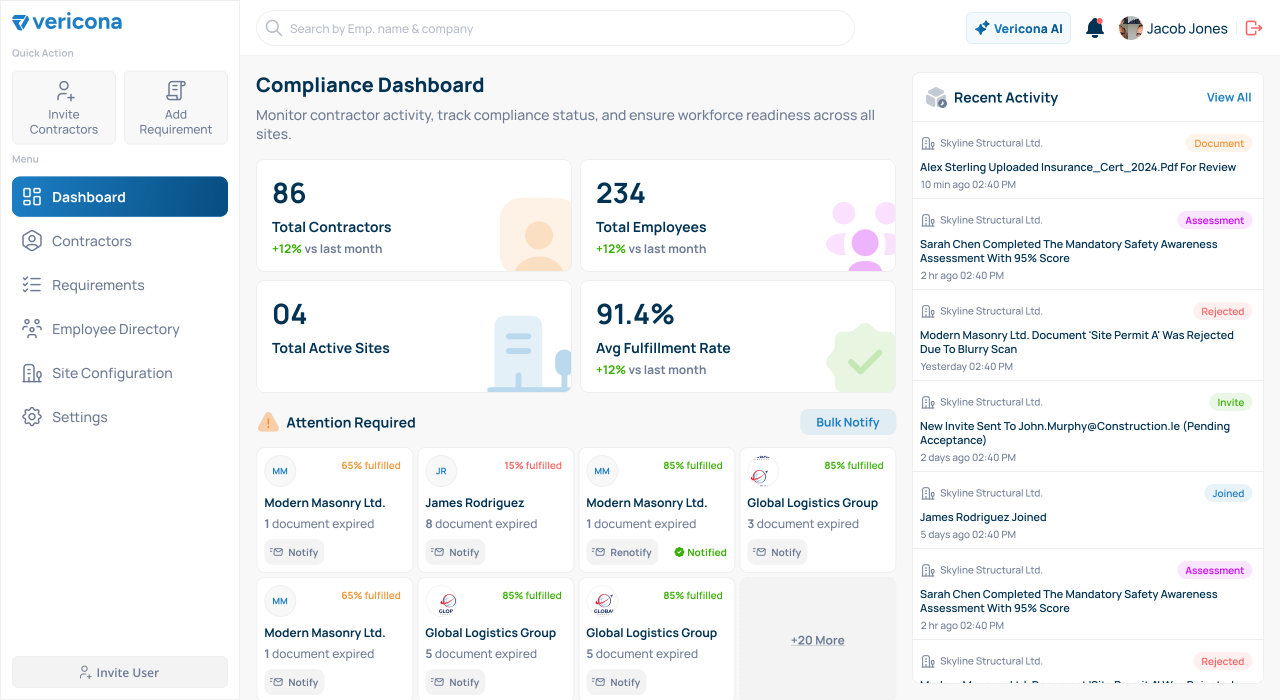
Their compliance is your liability
When a contractor works on your site, their paperwork becomes your risk. Could you answer these today?
Is everyone on site today actually cleared to be there?
Did anyone notice which certificates expired this week?
If a regulator called tomorrow, could we prove any of it?
VERICONA gives you a straight answer to all three from one place.
How it works
From setup to site-ready in four steps
-
Client
Set your requirements
Decide which documents and assessments each type of contractor needs and which sites they apply to.
-
Client
Invite contractors
Send an invitation by email. The contractor registers their company, adds their people and sees what you need from them.
-
Contractor
Submit evidence
They upload documents and take assessments in their own portal. VERICONA checks each one against your rules straight away.
-
Client
Track readiness
Watch readiness on the dashboard. VERICONA reminds contractors before documents expire and you can export reports when an auditor asks.
Product
What our contractor compliance software does
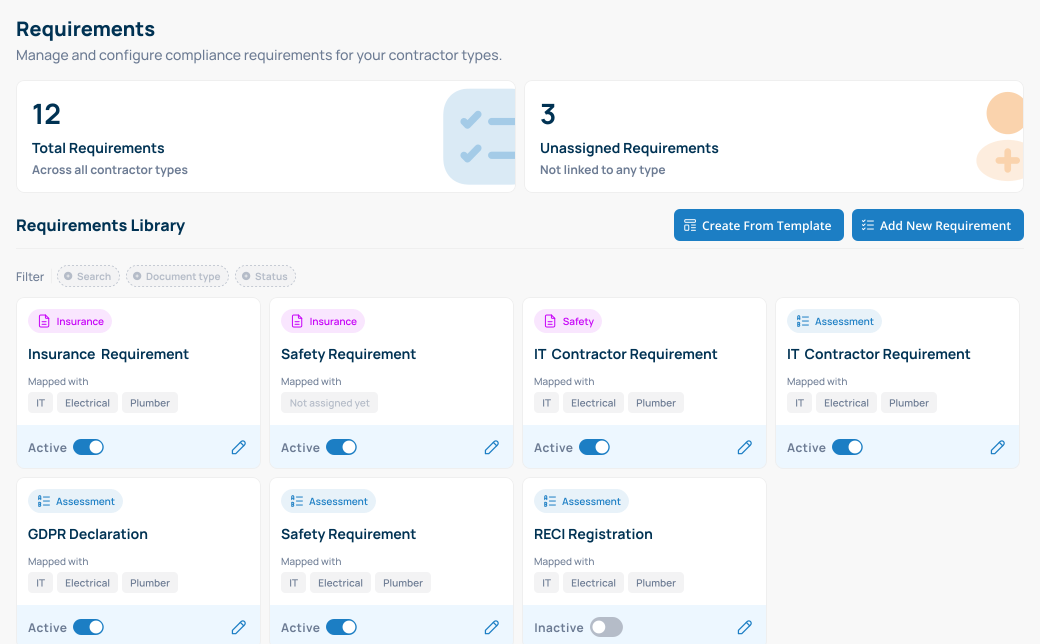
Requirements
Decide what compliant means for you
Build document requirements and knowledge assessments that match your own policies. VERICONA applies them to every contractor based on their type, so you only set them up once.
- Document requirements for insurance, safety and training, with rules you set such as a minimum coverage amount or a future expiry date
- Knowledge assessments with a pass mark you choose
- Company-wide requirements such as insurance and individual ones such as training certificates, plus ready-made templates to start from
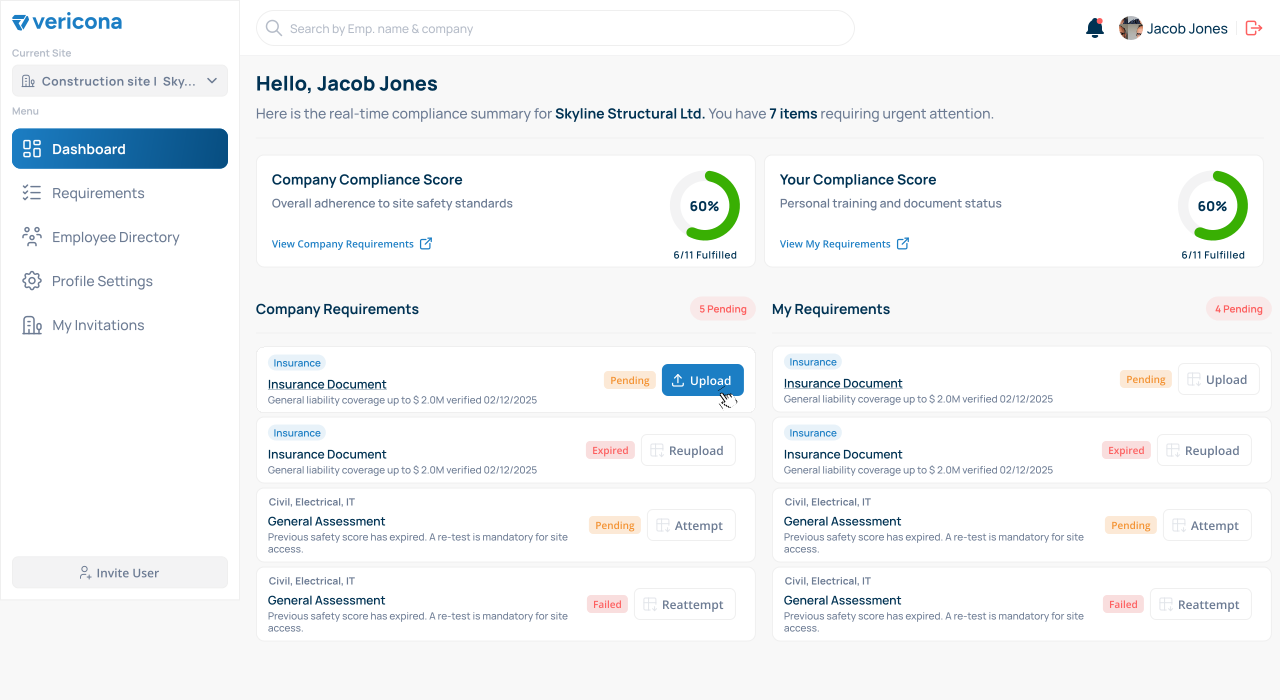
Contractor portal
Contractors handle their own paperwork
Each contractor gets their own portal. They accept your invitation, see exactly what you require and submit it there, with no emails going back and forth.
- Upload documents (PDF, JPG or PNG) and take assessments online
- Add employees and assign them to the right sites
- See their own compliance score and what still needs attention
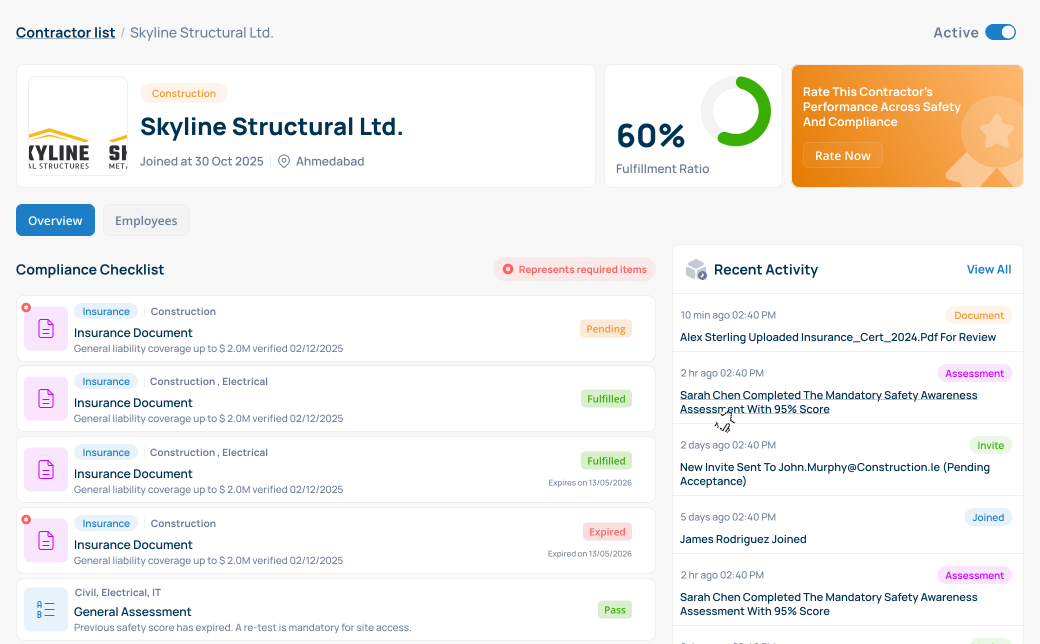
Contractor compliance
See who isn't ready before work starts
Every contractor has a checklist showing what's fulfilled, what's pending and what has expired. VERICONA reminds contractors automatically before documents expire. The dashboard flags anyone who still has gaps.
- A fulfillment rate for each contractor company and each employee
- Send your own reminder to one contractor or up to 50 at once, with every reminder logged
- Filter employees by site or score to see who isn't ready
Multi-site
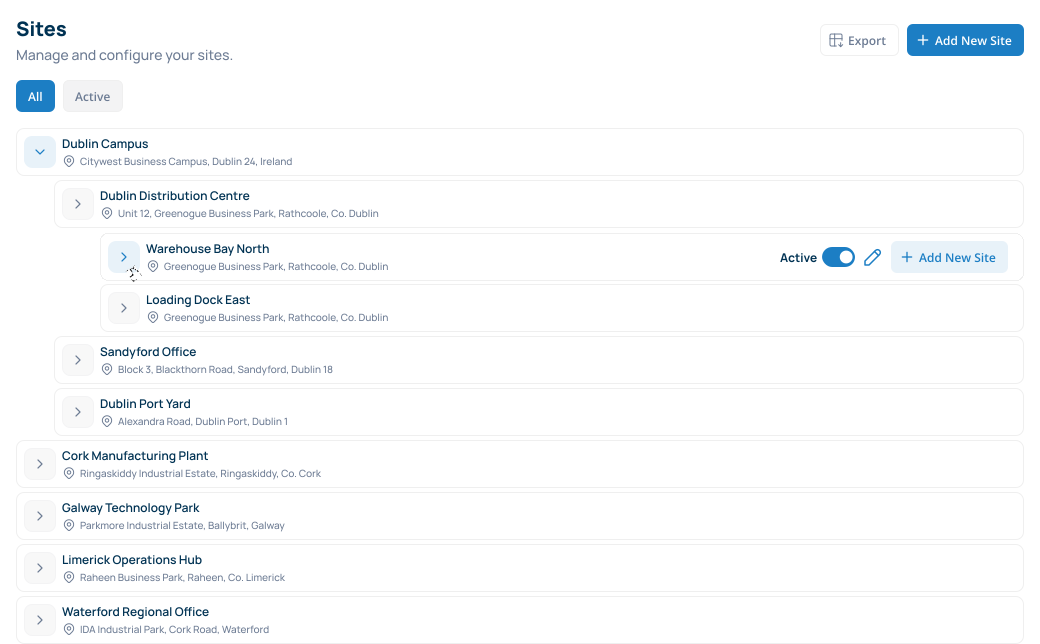
All your sites in one place
Group your sites the way your business is organized, for example a region with several plants. Each site has its own contractors and you can still see the whole picture.
- Assign each contractor to the site they work on and filter your lists by site
- Deactivate a site and keep its history
Reporting
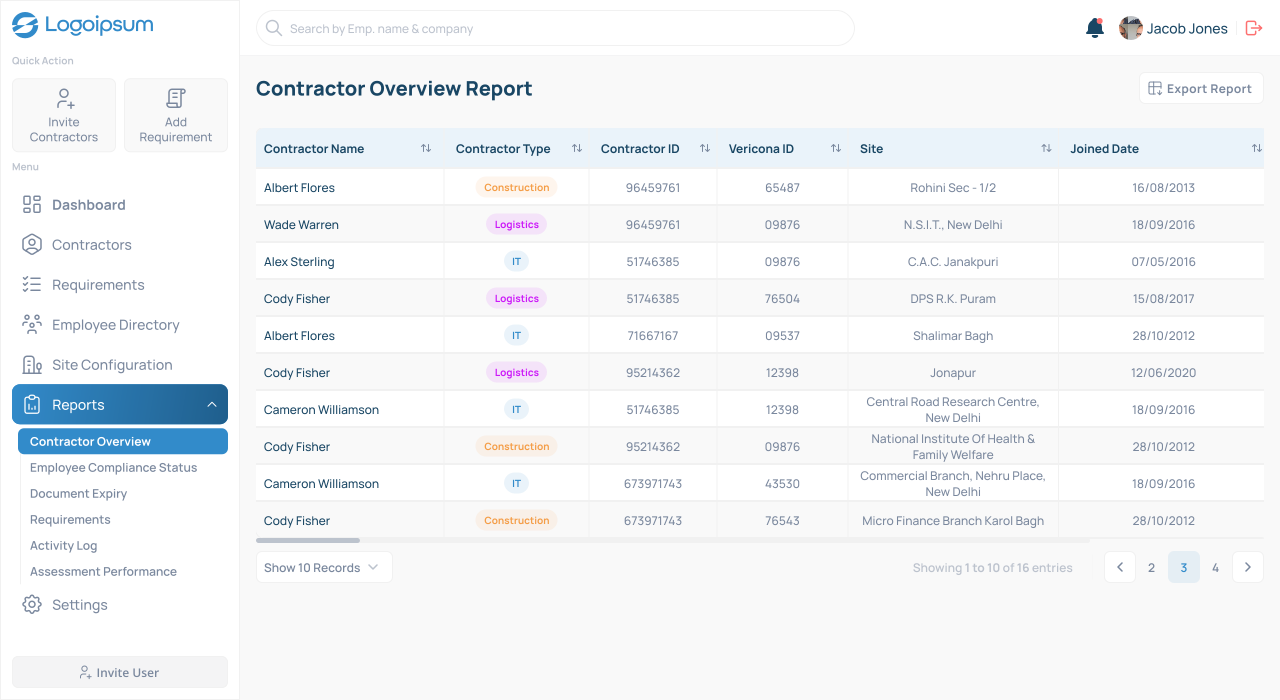
Reports for when an auditor calls
Every action is logged with who did it and when. The report library covers what auditors and site managers usually ask for.
- Six ready-made reports, including document expiry, employee compliance status and assessment performance
- Export to CSV or Excel with your filters applied
- A full trail of invitations, uploads, assessment results and reminders
AI assistant
Get answers without building a report
Type a question the way you would ask a colleague and VERICONA answers from your live contractor data. You don't need to set up filters or dashboards first.
- How many documents expire this week?
- Which employees have pending assessments?
- Which site has the lowest compliance score?
MCP Work from your own AI tools
VERICONA provides an MCP server (Model Context Protocol). AI assistants that support MCP can connect to your account, so clients can create requirements and contractors can upload documents from the assistant.
AI assistant
Example conversation
There are 247 active contractors at the Mumbai plant.
- 228 fully compliant
- 12 with pending documents
- 7 with expired certifications
Where it fits
Made for teams that bring in contractors
Every industry asks contractors for different things. Here are some typical examples.

Construction
Insurance, method statements and site inductions for civil, electrical and mechanical trades.

Pharmaceuticals
Training records, site induction and safety assessments before contractors enter production areas.

Manufacturing
Certificates and safety assessments completed before anyone enters the plant.

Mining
Site inductions and training certificates for contractors working on remote sites.

Energy and utilities
Safety training and insurance checks for contractors who need certification to access a plant.

Logistics
Driver and warehouse contractors working across several sites.
Want to see how it would work for you?
Book a 30-minute demo and we'll walk you through the platform.
Security and data protection
How we protect your data
Contractor documents and worker records are sensitive, so this is what we do to protect them.
Secure sign-in
Microsoft Entra handles sign-in, so we never store passwords. Multi-factor sign-in is supported.
Your data stays separate
One customer can't see another's data. Documents have no public links.
Choice of data region
Hosted in the EU by default. Other regions are available on request.
Complete audit trail
Every upload, assessment result and reminder is logged with who did it and when.
Questions about security? Contact us.
Compare
VERICONA vs the alternatives
- Supported
- Partial, limited or manual
- Not supported
This is our general view of how these approaches compare. Individual products vary.
FAQ
Frequently asked questions
Each submission is checked against the rules you set, such as a minimum coverage amount or an expiry date in the future. If it passes, it's marked Fulfilled. If a value misses a rule, it stays Partial until the contractor corrects it. There's no manual approval queue. VERICONA scores the evidence contractors provide but doesn't verify that a document is genuine. Your team can open every uploaded file.
Contractors accept an invitation, see what you require and upload their documents or take their assessments. Requirements are assigned from their contractor type so they don't have to guess.
There are three steps: add your sites, build or import your requirements and invite your contractors. We provide ready-made templates such as public liability insurance and site safety induction. We'll help you plan the rollout in your demo.
Yes. VERICONA provides an MCP server, so AI assistants and tools that support MCP can connect to your account. Clients can create requirements and contractors can upload documents that way. An assistant has the same access as the person who connects it, so a contractor only reaches their own company's data. You can also export contractors, employees and sites to CSV or Excel.
It's the share of required items that are fulfilled and in date, worked out for the company and for each employee. Optional items are tracked but don't affect the score.
Your data is encrypted in transit and hosted in the EU by default. Contractors, employees and sites can be exported to CSV or Excel from their list pages. We can host your data in another region if you need it. The privacy policy has the full details.
Who pays depends on the country. In some countries the client pays and in others the contractor does. We're still finalizing the details. Book a demo and we'll explain exactly what applies to your organization and your contractors.
Book a demo
See how VERICONA would work for you
In 30 minutes we'll show how requirements, contractor onboarding and live compliance tracking would work for your organization.
- 1Send your details. We reply within one business day.
- 2We'll show you the platform and answer questions.
- 3You decide what happens next. There's no obligation.
Prefer email? Write to hello@vericona.com.